In the era of Hybrid Work, investing in a professional conferencing system not only helps businesses connect flexibly but also improves work performance and maintains a professional image in front of partners and customers. The article below shares experiences in designing and implementing the optimal conference system for small and medium-sized meeting rooms, helping businesses both save costs and ensure the best meeting experience.
1. Identify Actual Needs
• How many people are in a meeting per room on average?
• The main purpose: online, hybrid or internal presentations?
• Platforms used: Microsoft Teams, Zoom, Google Meet...?
• Is the meeting room fixed or needs to be moved flexibly?
• Is there a requirement to share content from a personal laptop (BYOD)?
2. Design Principles & Suggested Configuration
Small Meeting Room (4–6 people)
Camera + Mic: Logitech MeetUp / Rally Bar Huddle / Rally Bar Mini
Screen: 55–65-inch wall-mounted TV
Connectivity: USB-C or HDMI (BYOD)
Controls: Remote or tablet with Teams/Zoom control
Best Practice:
• Uses a wide-angle camera (>120 degrees), built-in mic & speaker.
• The TV is at eye level, the camera is above or below.
• Prioritize BYOD connectivity via USB-C hub or HDMI.
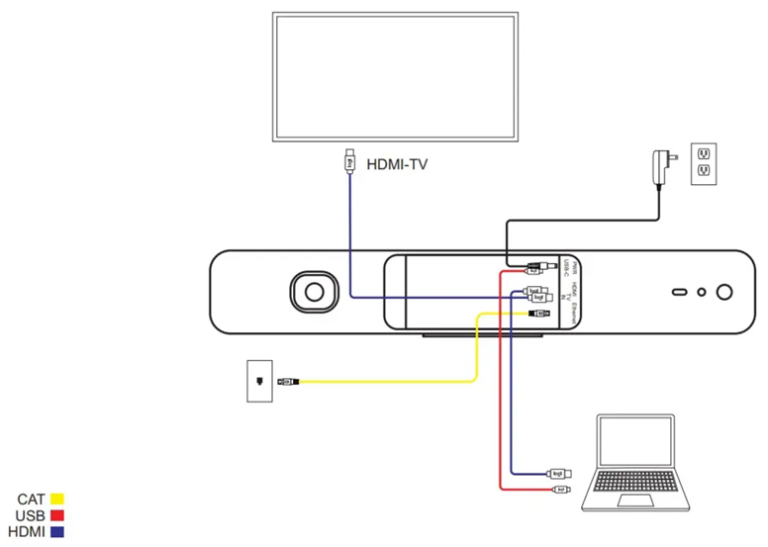
Medium Meeting Room (8–12 people)
Camera + Mic: Logitech Rally Bar / Rally Plus
Screens: 2x 65" TVs or 85" TVs
Controls: Teams/Zoom touch tablet
Audio: Extended mic pod + XLR mini stereo speakers
Connection: HDMI/USB-C/RJ45/Display Hub
Best Practice:
• The camera has AI speaker tracking.
• Sound using directional beamforming.
• Neat floor-to-ceiling wiring.
• One-touch join from the control tablet.

3. Assistive technology to note
• Automated meeting scheduling integration from Microsoft 365/Google Calendar.
• One-touch join via touch tablet.
• Cross-platform compatibility: Teams, Zoom, Google Meet.
• Manage devices remotely via a platform like Logitech Sync.
• Automatically update camera and control device firmware.
4. Conclusion
A well-designed conference system not only enhances the meeting experience, but also contributes to strengthening the professional image of the business in the eyes of customers and partners. Choosing the right equipment for the size of the room and the platform used will help businesses optimize costs, simplify operation and easily expand when necessary. If you need detailed advice or custom design of a conference system for your business, contact us – our team of experts is always ready to accompany you.
Device configuration suggestions by popular brands
🔹 Solutions from Logitech
✅ Small meeting room (4–6 people)
Category | Recommended Logitech Devices |
Video bar | Logitech MeetUp – wide-angle camera, mic, built-in speaker |
Monitor | TV LG/Samsung 55–65 inch |
Connect | BYOD via HDMI/USB-C or mini PC (Intel NUC) |
Control | Remote đi kèm MeetUp |
✅ Medium meeting room (8–12 people)
Category | Recommended Logitech Devices |
Video bar | Logitech Rally Bar |
Extended Mic | Rally Mic Pod (1–2 cái tùy phòng) |
Monitor | 2x TV LG/Samsung 65 inch |
Control | Logitech Tap IP (chạy Teams Room/Zoom Room) |
Basis | Dell/HP Mini PC or Android device |
🔹 Solutions from Poly (HP)
✅ Small Meeting Rooms
Category | Recommended Poly Devices |
Video bar | Poly Studio R30 |
Monitor | TV Sony/Sharp 55–65 inch |
Control | Included Remote or Poly Lens App |
✅ Medium Meeting Room
Category | Recommended Poly Devices |
Video bar | Poly Studio X50 |
Extended Mic | Poly TC8 (touch tablet as control at the same time) |
Monitor | Dual Display (2 TV 65”) |
Basis | Built-in Native Zoom/Teams in X50 |
🔧 Additional Auxiliary Equipment (Applicable to both brands)
Category | Suggest |
Switch mạng PoE+ | Cisco CBS350-8P-E-2G / Aruba 1930 |
Hub USB-C / HDMI | Ugreen, Dock Dell/Lenovo hoặc ClickShare C-5/C-10 |
Mini PC | Intel NUC / Dell OptiPlex |